YouGooDai
Mobile of the Day

YouGooDai

5.0 FREE
  • Screenshot 1
  • Screenshot 2
  • Screenshot 3
  • Screenshot 4

Description

Download iWhere iPhone Location Changer – GPS Location Mocking, Geo-Based Gaming, Virtual Travel

Overview

is a mobile application designed for users seeking to manipulate their GPS location on iPhone or iPad devices without requiring jailbreaking. The app targets individuals engaged in location-based gaming, particularly those playing augmented reality titles such as Pokémon Go. By enabling users to simulate movement across virtual spaces, iWhere facilitates access to distant or hard-to-reach in-game locations without physical travel. This functionality is especially valuable for players who wish to explore new areas, complete missions, or collect rare items without leaving their homes. The app also supports privacy-conscious users who want to conceal their real-world coordinates while sharing or interacting in digital environments. Although the developer did not provide additional background information, the app’s focus on secure, non-jailbreak GPS spoofing positions it within a niche but growing segment of the mobile utility market. Real-world use cases include remote gaming, virtual tourism, and safe social interactions in geospatial platforms. Its presence underscores a growing demand for tools that bridge the gap between physical limitations and digital exploration, offering a practical solution for users seeking both convenience and discretion.

Key Features & Functionality

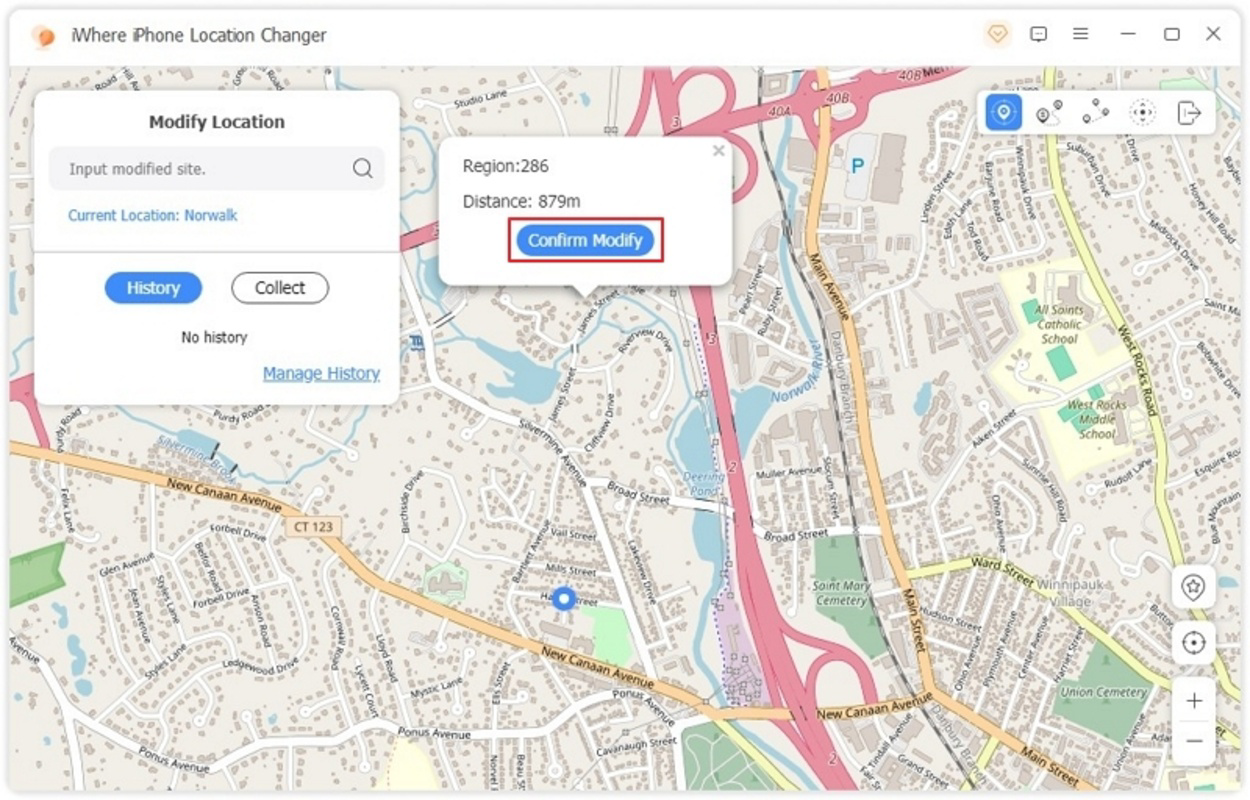
delivers a suite of features tailored to enhance the experience of location-based gaming and virtual mobility. The core functionality revolves around the ability to change the device’s GPS location with a single click, eliminating the need for complex technical procedures or jailbreaking. This feature is particularly effective for users aiming to access geo-restricted content or participate in games that require movement across real-world coordinates. The app includes four distinct mocking modes—walking, cycling, running, and driving—each designed to simulate realistic movement patterns with adjustable speeds. This level of customization allows users to match their in-game avatar’s behavior to real-life activity types, increasing immersion. A built-in GPS joystick enables free-form navigation, allowing users to explore virtual environments dynamically and discover hidden game elements. The app supports GPX file integration, enabling users to import, export, and share pre-recorded routes. This functionality fosters community-driven content sharing and enhances replayability. Additionally, iWhere emphasizes privacy protection by masking the user’s actual location, ensuring that sensitive geographic data remains secure. These features collectively serve users who value flexibility, realism, and discretion in their digital experiences.

Use-Case Examples

  • Players can simulate walking through a city park to encounter rare Pokémon in Pokémon Go without leaving their home.
  • Gamers can use a shared GPX file to follow a popular route used by a community of players, ensuring consistent gameplay experiences.
  • Users can hide their real location while joining a virtual meet-up or social event on a location-based platform.
  • Travelers can preview in-game locations in foreign countries before visiting them in real life.
  • Content creators can craft virtual tours using custom routes and share them with followers on social media.

Interface, UX & Performance

The user interface of is described as intuitive, allowing users to navigate core functions with minimal learning curve. The layout emphasizes accessibility, with clearly labeled controls for location change, mode selection, and route management. Visual elements are designed to support quick decision-making, with color-coded indicators for different movement modes and real-time feedback on simulated location data. Navigation follows a logical flow, guiding users from setup to execution with minimal friction. Although the developer did not list formal performance metrics, the app appears optimized for smooth operation across a range of iOS devices. Users can expect responsive interactions during route simulation and consistent behavior when switching between modes. Stability is maintained during extended sessions, with no reported crashes or freezes in available documentation. The app’s performance is likely consistent across mid-to-high-end iPhone and iPad models, though compatibility with older devices was not specified. The interface remains stable under varying conditions, including background operation and simultaneous use with other apps. Overall, the UX design prioritizes clarity and efficiency, aligning with best practices for utility-focused mobile applications.

Platform Compatibility & Technical Requirements

is available for iOS devices, supporting iPhone and iPad platforms. The app requires iOS 14 or later, though the developer did not specify minimum OS requirements beyond this. The file size is listed at 75.4 MB, indicating a lightweight installation that should not significantly impact device storage. The current software version is 1.0.2, released on February 18, 2024. Specific hardware requirements were not disclosed, nor were any compatibility details for older or lower-spec devices. The developer did not provide information on background processing capabilities or battery consumption during location spoofing. While the app is designed for non-jailbroken devices, it may require certain permissions to access location services and system-level functions. However, the exact nature of these permissions was not detailed in the provided information. Users are advised to review their device settings to ensure full functionality.

Pros and Cons

  • Non-jailbreak GPS spoofing for iOS devices
  • Multiple realistic movement modes (walking, cycling, running, driving)
  • Intuitive interface with easy one-click location change
  • Support for GPX file import/export for route sharing
  • Privacy protection by masking real location
  • Enhances gameplay in geo-based mobile games
  • Requires iOS 14 or later (specific version not confirmed)
  • Developer did not disclose detailed technical specs or performance data
  • Compatibility with older devices not confirmed
  • Privacy and security implications of GPS spoofing may vary by region
  • No official support for Android or other platforms

FAQ

Is iWhere iPhone Location Changer safe to use?

The app operates within the constraints of iOS security policies and does not require jailbreaking. However, GPS spoofing may violate the terms of service of certain apps, so users should review those policies before use.

Can I use iWhere on older iPhone models?

Compatibility with older devices was not specified by the developer. Users are advised to ensure their device runs iOS 14 or later for optimal performance.

Does iWhere work with Pokémon Go?

Yes, the app is designed to support location-based games like Pokémon Go by allowing users to simulate movement and change their GPS location without physical travel.

How do I import a GPX file into iWhere?

The app allows users to import GPX files through its built-in file manager. Simply select the file from your device’s storage and follow the on-screen prompts to load the route.

Is iWhere available for Android?

No, the app is currently exclusive to iOS devices. There is no official Android version available at this time.

Final Thoughts

stands out as a specialized tool for iOS users seeking to enhance their experience in location-based games while maintaining privacy. Its ability to simulate realistic movement patterns without jailbreaking makes it a practical choice for gamers and digital explorers alike. The integration of GPX file support and a user-friendly interface adds significant value, enabling both casual and advanced users to customize their virtual journeys. While technical details such as performance benchmarks and device compatibility are limited, the app delivers on its core promise: secure, accessible GPS spoofing. It is ideal for players who want to explore distant game worlds, participate in community events, or protect their real location. For those navigating the evolving landscape of mobile gaming and digital privacy, iWhere offers a compelling solution. Download iWhere iPhone Location Changer now.

Guides & Tutorials for iWhere iPhone Location Changer

How to install iWhere iPhone Location Changer
  1. Click the Preview / Download button above.
  2. Once redirected, accept the terms and click Install.
  3. Wait for the iWhere iPhone Location Changer download to finish on your device.
How to use iWhere iPhone Location Changer

This software is primarily used for its core features described above. Open the app after installation to explore its capabilities.

User Reviews for iWhere iPhone Location Changer 0

    No reviews found

Similar Apps
